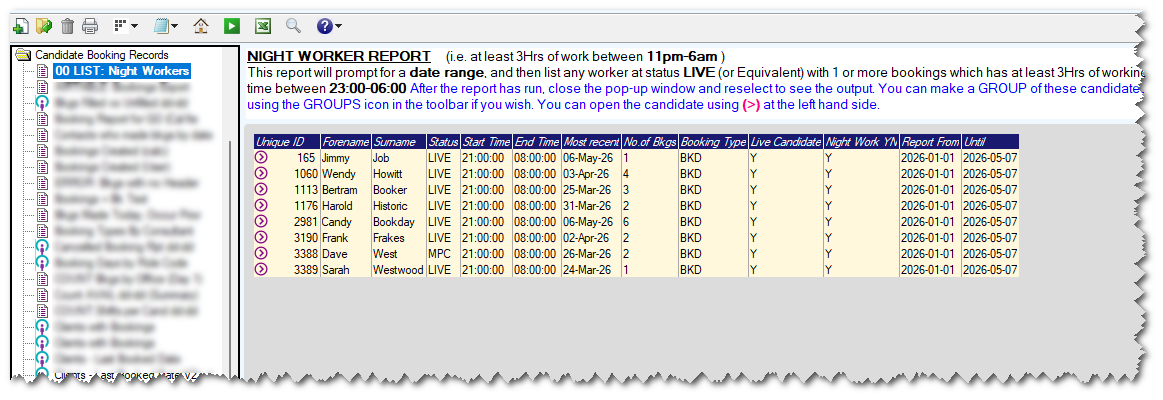
This report will list any workers who are LIVE (or Equivalent) status, and who have one or more bookings with working hours between 11pm-6am
For these night workers, you may wish to contact them and offer them the chance to fill-in a Night Health Questionnaire or similar. This is in accordance with the Working Time Regulations 1998, that state you must offer people the chance for a free Health Assessment, before starting night work, and regularly thereafter.
(If you search online you will find more details regarding the working time regulations 1998 )
Example - (Screenshot)
Notes/Special Features
The report looks at the Candidate Bookings File to identify any workers with a LIVE status (or equivalent)
It will prompt for a date range.
It considers anyone with a booking that has 3Hrs or More working time between 11pm - 6am
Assumptions
The report assumes that your "Live" candidate status has the code LIVE - and then looks for any other statuses which have been set as 'synonymous' with this.
Installation
You will need to download the attached file: IX_00_LISTNWR.Zip
The report can be installed on Influence Professional systems from version 1.00.14.109 or later by downloading the report attached to this article, then Dragging/dropping the report onto the [I Query] workbench within the [Admin] section of the system. For more information about installing IQ Reports, please Click Here
On newer Systems, you load can the *.zip version of the report.
Was this article helpful?
That’s Great!
Thank you for your feedback
Sorry! We couldn't be helpful
Thank you for your feedback
Feedback sent
We appreciate your effort and will try to fix the article