Report 1 - User Profiles (standard)
File to drop on IQ screen: IX_USER0001.zip
This report will give a list of all the UserID's which exist within your database. It will show the user ID, name and various permissions, including if they have access to SMS (text) messages or Postcode Radius Search.
Example - (Screenshot)
Report 2 - User System Controls (where applicable)
File to drop on IQ screen: IX_ACLRPT.zip
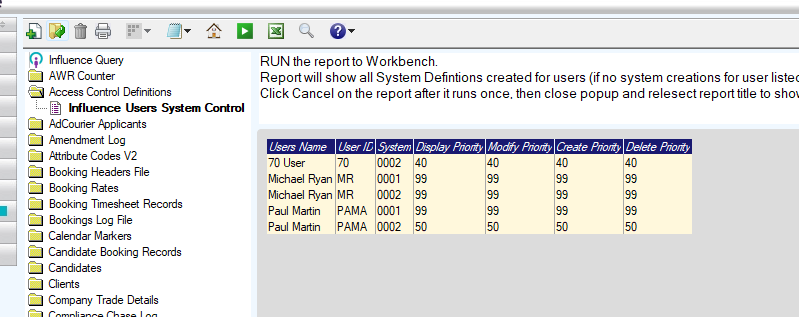
This report will show which systems users have access to and the permissions for each one.
Note if a user does not show on this list, they may have access to all systems (depending on their general priorities, see report 1 above)
Notes/Special Features
The report assumes that there are multiple Databases in-use, for this system.
It is based on the [Access Control Definitions] file.
Installation
The report(s) can be installed on Influence Professional systems from version 1.00.14.109 or later by downloading the report attached to this article, then Dragging/dropping the report onto the [I Query] workbench within the [Admin] section of the system. For more information about installing IQ Reports, please Click Here
For newer systems after 1.00.21.021 You can load the *.ZIP file version of the report which includes an explanation of the report.

Was this article helpful?
That’s Great!
Thank you for your feedback
Sorry! We couldn't be helpful
Thank you for your feedback
Feedback sent
We appreciate your effort and will try to fix the article